Introduction:
Today we will be developing modern GitOps Solution for managing infrastructure and application deployments. We will be deploying full stack microservices application using GitOps principles with ArgoCD, Helm, Kubernetes and Github Actions.
We will be using two github repositories for this solution
- Microservices repository AppsLog
- Helm charts repository AppsLog-GitOps
Core Microservices:
Here is the breakdown of all microservices Tech Stack and roles.
| Service | Role | Tech |
|---|---|---|
| service-app | React frontend to visualize logs | React.js |
| service-api | Exposes REST API to fetch logs | Flask (Python) |
| service-data | Persists and retrieves logs from DB | Flask + PostgreSQL |
| postgres | Centralized log storage | PostgreSQL |
Architecture Overview:
This is how our final GitOps solution will looks like.

Tech Stack:
- ArgoCD
- Helm
- Kubernetes
Pre-requists: Code Editor, Docker, Minikube
Continous Integration:
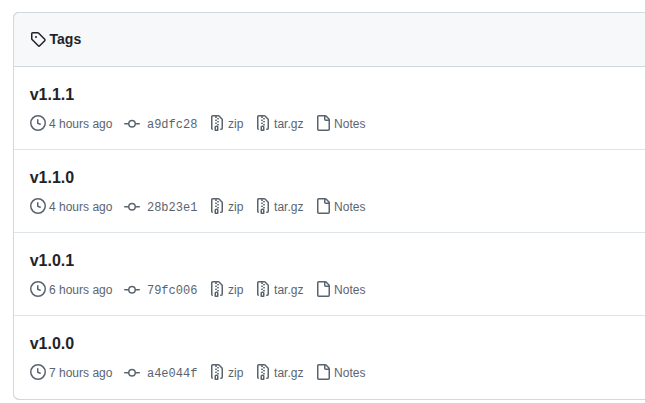
Inside AppsLog repository, I have created git action workflow for CI. Using this workflow every code push creates a new release with version tags like v1.1.0 and Inside release pipeline we are creating docker images with newest version tags and pushing those images to Dockerhub. We are also updating version tags inside AppsLog-GitOps repository values.yaml file.
This is how our final git actions CI workflow looks like:
name: Release Pipelineon:push:branches:- mainjobs:semantic-release:name: Release Pipelineruns-on: ubuntu-latestconcurrency: releasepermissions:id-token: writecontents: writesteps:- name: Checkout Repositoryuses: actions/checkout@v3with:fetch-depth: 0- name: Python Semantic Releaseid: releaseuses: python-semantic-release/python-semantic-release@masterwith:github_token: ${{ secrets.GIT_ACTIONS_SECRET }}# --- Build and Push Docker Image ---- name: Set up Docker Buildxuses: docker/setup-buildx-action@v3- name: Log in to Docker Hubuses: docker/login-action@v3with:username: ${{ secrets.DOCKERHUB_USERNAME }}password: ${{ secrets.DOCKERHUB_TOKEN }}- name: Build and Push Docker Imageuses: docker/build-push-action@v6with:context: ./service-apifile: ./service-api/Dockerfilepush: truetags: |${{ secrets.DOCKERHUB_USERNAME }}/service-api:latest${{ secrets.DOCKERHUB_USERNAME }}/service-api:v${{ steps.release.outputs.version }}- name: Build and Push Docker Imageuses: docker/build-push-action@v6with:context: ./service-datafile: ./service-data/Dockerfilepush: truetags: |${{ secrets.DOCKERHUB_USERNAME }}/service-data:latest${{ secrets.DOCKERHUB_USERNAME }}/service-data:v${{ steps.release.outputs.version }}- name: Build and Push Docker Imageuses: docker/build-push-action@v6with:context: ./service-appfile: ./service-app/Dockerfilepush: truetags: |${{ secrets.DOCKERHUB_USERNAME }}/service-app:latest${{ secrets.DOCKERHUB_USERNAME }}/service-app:v${{ steps.release.outputs.version }}provenance: falsebuild-args: |APP_ENV=productionREACT_APP_API_URL="service-api:5000"REACT_APP_API_URL_DATA="service-data:5000"- name: Logout from Docker Hubrun: docker logout- name: Checkout gitops repouses: actions/checkout@v4with:repository: shujaakbar2020/AppsLog-GitOpstoken: ${{ secrets.GIT_ACTIONS_SECRET }}} # token with write permissionpath: gitops-repofetch-depth: 0- name: Update image tag in gitops repo (values.yaml)run: |git config --global user.email "shujaakbar2020@gmail.com"git config --global user.name "Shuja Akbar"cd /home/runner/work/AppsLog/AppsLog/gitops-repogit checkout maingit remote show origingit remote set-url origin https://${{ secrets.GIT_ACTIONS_USER }}:${{ secrets.GIT_ACTIONS_SECRET }}@github.com/shujaakbar2020/AppsLog-GitOps.gitFILE=values.yamlyq eval ".service-app.image.tag = "v${{ steps.release.outputs.version }}"" -i "$FILE"yq eval ".service-api.image.tag = "v${{ steps.release.outputs.version }}"" -i "$FILE"yq eval ".service-data.image.tag = "v${{ steps.release.outputs.version }}"" -i "$FILE"git add "$FILE"git commit -m "chore: update image tag to ${{ steps.release.outputs.version }}"git loggit push origin main
Releases:
Every time above git actions pipeline runs successfuly, it creates a new release for any feature, fix or any chore update. We mark every release with git tags.
- Git tags:
- DockerHub tags:

Update GitOps repository:
We also update the AppsLog-GitOps repository values.yaml file with updated docker image tags
service-api:image:repository: saakbar/service-apppullPolicy: IfNotPresenttag: "v1.0.1"service-data:image:repository: saakbar/service-apppullPolicy: IfNotPresenttag: "v1.0.1"
Continous Deployment:
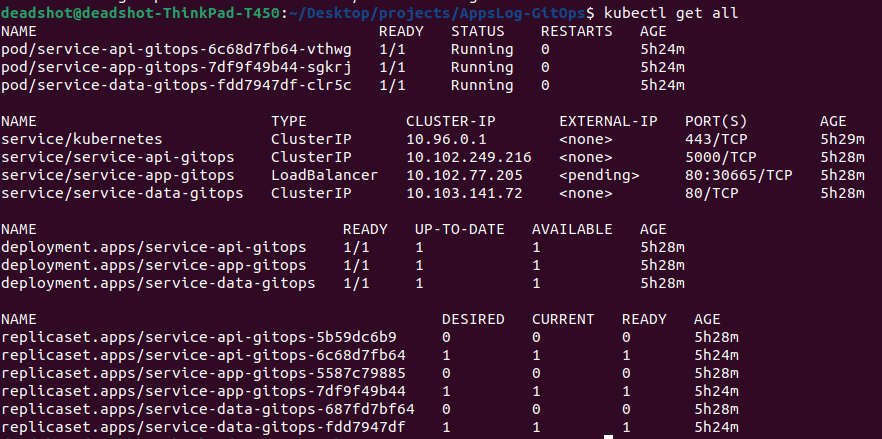
We will be using ArgoCD for CD. ArgoCD runs inside the Kubernetes cluster and continuously monitors the connected Git repository. We will be deploying helm charts for our microservices. We have created these helm charts inside our AppsLog-GitOps repository.

These are list of resources created by our helm charts.
Conclusion:
This project demonstrates a production-grade GitOps workflow using:
- GitHub Actions -- CI
- Docker -- Containerization
- Helm -- Packaging
- Kubernetes -- Orchestration
- ArgoCD-- GitOps Engine
Git is now the control plane.
📂 You can explore the full implementation here:
Microservices: github.com/shujaakbar2020/AppsLog
GitOps Config: github.com/shujaakbar2020/AppsLog-GitOps