In this tutorial we will be creating elasticsearch cluster with:
- 2 Master Nodes
- 4 Data Nodes
- 1 Ingest Node
- 1 Machine Learning Node
- 1 Transform Node
Pre-requists: Kubernetes cluster on AWS, AZURE, GCP
Install CRDs for ECK:
We will start by installing CDRs for Elastic Cloud on Kubernetes(ECK).
kubectl create -f https://download.elastic.co/downloads/eck/2.11.0/crds.yaml
Once you run above command, following Elastic resources will be created
customresourcedefinition.apiextensions.k8s.io/agents.agent.k8s.elastic.co createdcustomresourcedefinition.apiextensions.k8s.io/apmservers.apm.k8s.elastic.co createdcustomresourcedefinition.apiextensions.k8s.io/beats.beat.k8s.elastic.co createdcustomresourcedefinition.apiextensions.k8s.io/elasticmapsservers.maps.k8s.elastic.co createdcustomresourcedefinition.apiextensions.k8s.io/elasticsearches.elasticsearch.k8s.elastic.co createdcustomresourcedefinition.apiextensions.k8s.io/enterprisesearches.enterprisesearch.k8s.elastic.co createdcustomresourcedefinition.apiextensions.k8s.io/kibanas.kibana.k8s.elastic.co createdcustomresourcedefinition.apiextensions.k8s.io/logstashes.logstash.k8s.elastic.co created
Install ECK Operator:
Now, we will instal ECK operator with RBAC rules with following command.
kubectl apply -f https://download.elastic.co/downloads/eck/2.11.0/operator.yaml
Note: This will create a namespace elastic-system.
Deploy Elasticsearch:
Finally we will be deploying the Elasticsearch cluster with different node types. Here is configuation files for kubernetes.
apiVersion: elasticsearch.k8s.elastic.co/v1kind: Elasticsearchmetadata:name: elastic-clusterspec:version: 8.12.0nodeSets:- name: master-nodescount: 2config:node.roles: ["master"]node.store.allow_mmap: false- name: data-nodescount: 4config:node.roles: ["data"]node.store.allow_mmap: false- name: ingest-nodescount: 1config:node.roles: ["ingest"]node.store.allow_mmap: false- name: machine-learning-nodescount: 1config:node.roles: ["ml"]node.store.allow_mmap: false- name: transform-nodescount: 1config:node.roles: ["transform"]node.store.allow_mmap: false
Elasticsearch cluster with total 9 nodes is deployed on kubernetes cluster. With different roles for every node.

Default username for elasticsearch is elastic. You can check the password with this command.
kubectl get secret -n elastic-system elastic-cluster-es-elastic-user -o go-template='{{.data.elastic | base64decode}}'
We can verify and check the health of the elastic cluster with these command:
kubectl port-forward service/quickstart-es-http 9200curl -u "username:password" -k "https://localhost:9200"
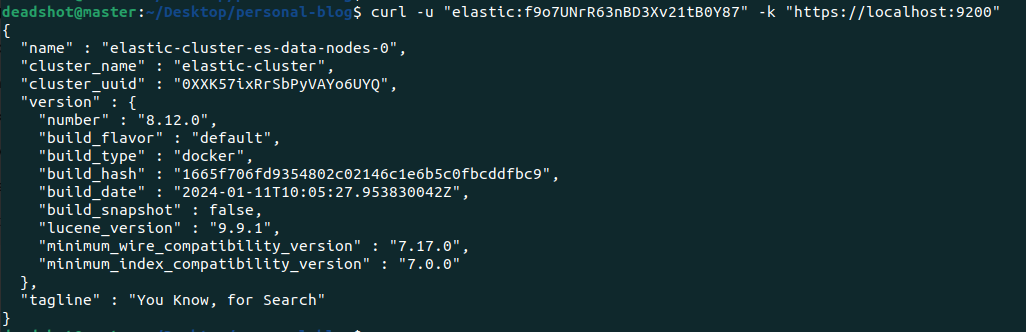
Elasticsearch cluster creation with different node roles is done. Also you can create ingress component to make your elasticsearch cluster public.
Happy clustering elasticsearch ☸☸☸